


The focus lens (sometimes referred to as the focal lens) in the xTool P3 is a critical optical component located inside the laser module. Its primary function is to refocus the laser beam onto the surface of the material after the beam has been reflected through the optical path. This ensures precise cutting and engraving performance.
Key Features
- Location: The focus lens is housed inside the laser module and is accessed by removing the magnetic front cover and unscrewing the focus lens holder.
- Standard Model: The xTool P3 comes standard with the M-type focus lens. If you have multiple focus lenses, you can distinguish their models by the markings on the packaging or by observing the lens's convexity (S > M > L in terms of convexity and focal length).
- Installation Orientation: The convex (curved outward) side of the focus lens must face up for correct operation.
- Maintenance: The lens should be kept clean and free from oxidation or damage. Contamination or incorrect installation can lead to incomplete or failed cuts.
Applications
- Laser Cutting: The focus lens concentrates the laser energy to a fine point, enabling the P3 to cut through various materials with precision.
- Engraving: Accurate focusing ensures detailed and consistent engraving results.
- Material Compatibility: Proper lens selection and maintenance are essential for optimal performance across different material types and thicknesses.
Maintenance and Troubleshooting
- Cleaning: If the focus lens is dirty or oxidized, it should be cleaned with a lint-free cloth and anhydrous ethanol. For detailed instructions, refer to the cleaning tutorial.
- Replacement: If the lens is cracked or severely oxidized, it should be replaced promptly.
- Installation Check: Always ensure the convex side faces up. Use visual inspection or the light reflection test as described in the troubleshooting guide.
- Model Verification: Confirm the lens model matches the holder and intended application. The M-type is standard for the P3.
Visual Reference
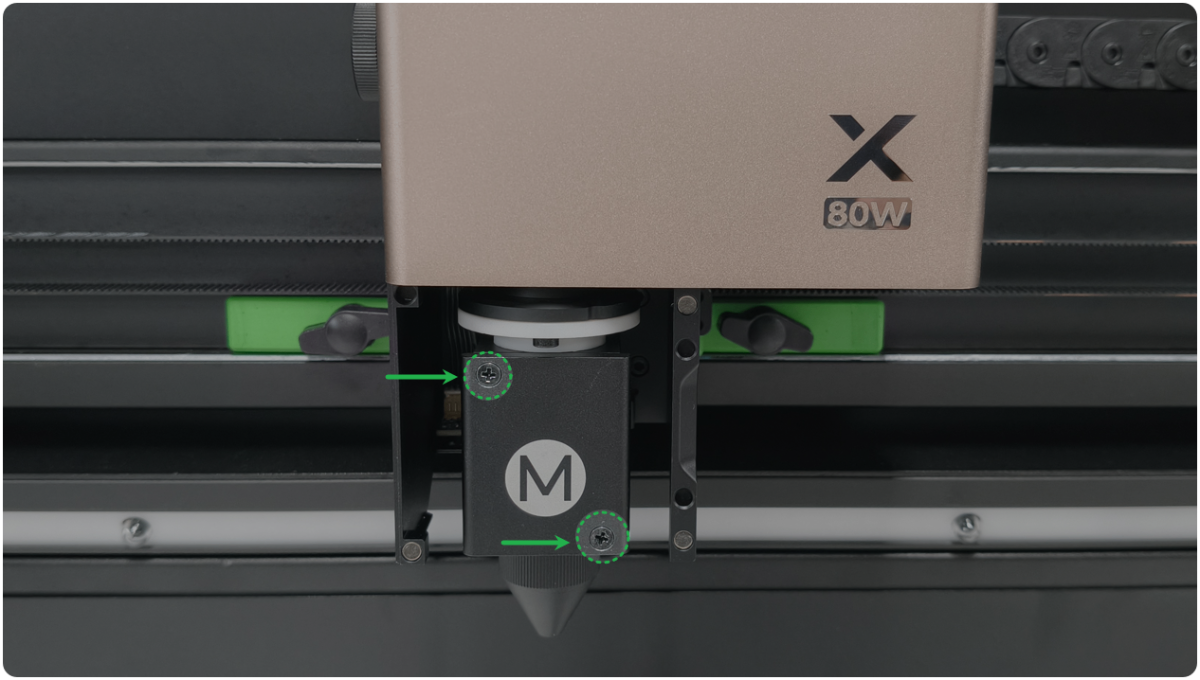
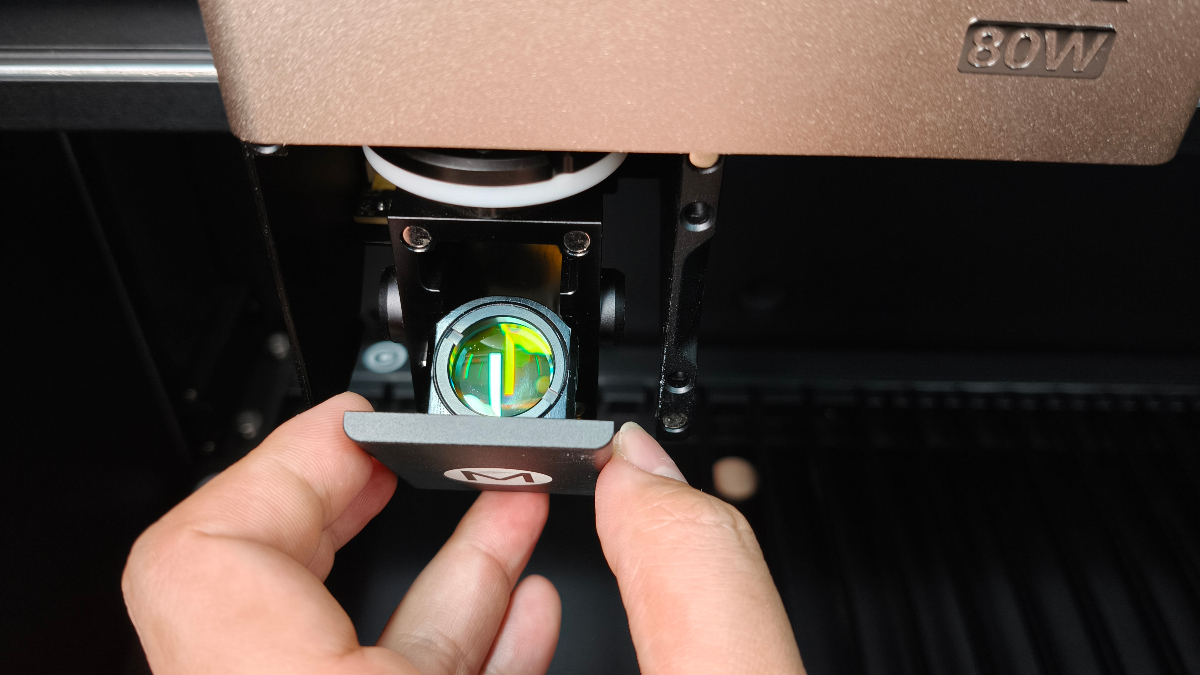
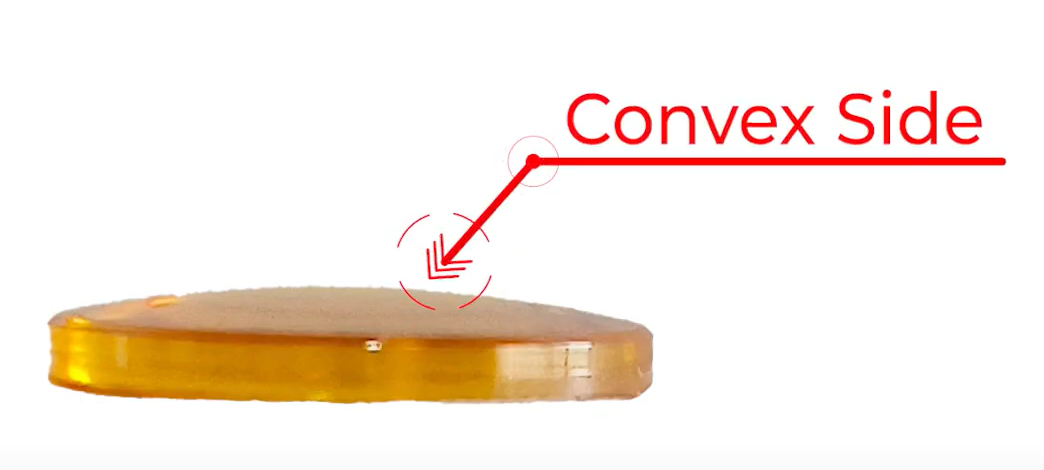
Additional Resources
- Troubleshoot Incomplete or Failed Cuts for xTool P3
- How to Clean Focus Lens, Window Lens, and Laser Mirror of xTool P3
For any issues related to the focus lens, such as detection errors or cleaning, refer to the offici
Maintenance and Cleaning
Regular maintenance is essential for optimal performance and longevity of your xTool P3 laser lens system.
Recommended Cleaning Frequency
- Daily: Check and clean the lenses.
- Every 4 hours: For high-power, continuous processing.
Tools Required
- Optical lens cleaner (high-concentration alcohol, isopropyl alcohol, etc.)
- Microfiber or optical lens cleaning cloth
- Air blower
- Rubber gloves
- Phillips screwdriver
Cleaning Procedure
- Power Off: Ensure the device is powered off before cleaning.
- Remove Lenses: Carefully remove the focus lens, window lens, or laser mirror as needed.
- Dust Removal: Use an air blower to remove loose dust.
- Apply Cleaner: Spray optical lens cleaner onto the cleaning cloth (not directly on the lens).
- Wipe: Gently wipe the lens in a straight line, always in the same direction.
- Dry: Ensure no water stains remain before reinstalling.
- Check for Damage: If you notice severe oxidation or cracks, replace the lens.
Cautions:
- Alcohol is flammable—keep away from heat and open flames.
- Do not place lenses directly on hard surfaces; use a clean cloth.
- After cleaning, check the optical path for alignment.
For a detailed video guide, see:
How to Clean Focus Lens, Window Lens, and Laser Mirror of xTool P3 – Full Guide
Replacement
- If the focus lens, window lens, or laser mirror is severely oxidized or cracked, replacement is necessary.
- Use only compatible xTool P3 parts—do not use lenses from other models.
Additional Resources
Note: Always refer to the official xTool P3 documentation for the most accurate and up-to-date procedures.


[nerdy-form:16962]
YOUR CART
Free Same Day Shipping On All Supplies!
Loading...