
REASONS AND SOLUTIONS:
1. One or more of the CMYK color channels are not printing
**Print head needs to be primed by doing a few head cleanings.

**Bottle of ink has run empty. Fill the bottle and ink tubes and prime the print head with head cleanings.
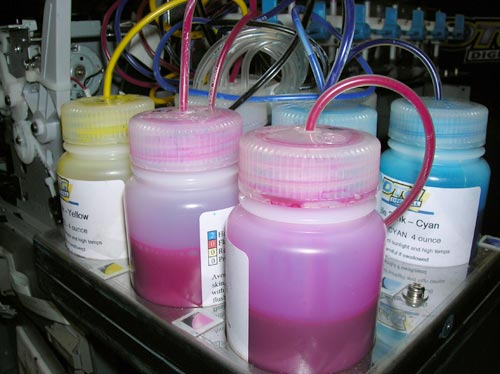
Prevention: Top off ink bottles regularly.
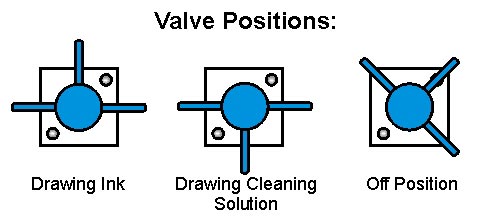
**Open any valves that may be off.
**Print head is clogged. Use head cleanings or flush with cleaning solution. If that doesn't work replace the print head.

Prevention: Run head cleanings on days that the printer is not printing. For periods longer then a week, flush ink out of system using distilled water. Run cleaning solution through the system and leave the cleaning solution in the system until you need to print again.
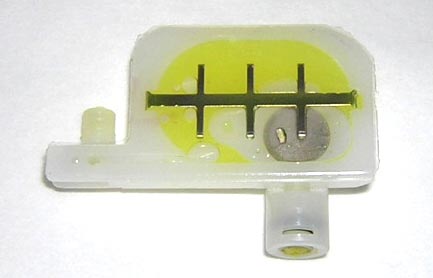
**Damper has hole or is clogged. Replace damper.
2. Computer monitor needs to be adjusted
**Make sure the RGB (Red Green Blue) values are balanced.
**Adjust the brightness if necessary.
3. Color profiles are being used in graphic program such as Photoshop.
**During the print process from the graphic program make sure that no color management is selected. RIP pro will handle the color profiling.
Recent Articles

ROLAND QUICK TIPS- How to Three-Layer Print with White Ink Using a TrueVIS LG or MG Series Printer
Subscribe to Media Posts
Recommended for You


